Tampilkan postingan dengan label Software. Tampilkan semua postingan

Kamis, 30 September 2010

Cara Instalasi Windows Seven (7)

Diantara brader-brader sekalian pembaca blog ini pasti ada yang belum pernah install sistem operasi windows kan? mungkin karena tekut salah, error ato mbleduk barangkali jadi takut mau coba2. hehe… terus kalo gak berani coba2 kapan bisanya donk. belajar komputer itu harus berani coba2, jangan takut salah, justru kalo kita pernah melakukan kesalahan jadi tau gimana cara mengatasi kesalahan tersebut di kemudian hari. Betul tidak? (aagym mode).

Nah skarang saya coba kasih tau caranya install windows seven (7) tahap demi tahap ya… oya instalasi windows seven (7) hampir sama kayak instalasi windows vista, pastinya lebih sederhana ketimbang instalasi windows xp ke bawah solanya tidak ada pertanyaan2 di tengah2 instalasi, setingan2 zona waktu dll dilakukansetelah proses instalasi selesai. gak kayak pas install windows xp kebawah yang ada di tengah2 yang lumayan mengganggu karena proses instalasi harus di tongkrongin, gak bisa ditinggal terus selese gitu.

sebelumnya berikut adalah Perbandingan Windows Seven (7) Starter, Home Premium, Professional dan Ultimate/Enterprise 64

Bagi anda yang mungkin mempertimbangkan akan mengganti system operasi ke windows seven (7) dan masih bingung mau pilih edisi yang mana. Silahkan perhatikan table perbandingan antar versi windows seven dibawah. Tapi kalo niatnya mau install yang bajakan ya ga usah capek2 bandingin. Langsung aja install yang ultimate. Hahaha….. enak to gampang to mantep too…

Sumber : Windows 7 Secrets

clip_image002

clip_image004

clip_image006

clip_image008

clip_image010

clip_image012

clip_image014

clip_image016

clip_image018

clip_image020

tapi kali ini win7 ultimate yang jadi bahan percobaan. Ok langsung aja ya
  • Sediakan komputer yang memenuhi syarat untuk bisa di install windows seven (7) kalo mau nyaman minimal dual core dengan memory 1GB
  • DVD instalasi Windows Seven (7)
  • Bensin 1 liter
  • Siramkan bensin ke komputer kemudian bakar!!! Hahaha… becanda brader…
  • Atur agar komputer booting dari dvd, pengaturan dilakukan lewat bios, bisanya tekan delete atau f2 ketika komputer baru dinyalakan pilih setingan booting kemudian pilih dvd rom menjadi urutan pertama. simpan konfigurasi bios dengan cara menekan f10.
  • Masukkan DVD Instalasi
  • Pencet sembarang tombol jika sudah ada pertanyaan apakan ingin boot dari cd or dvd
  • Muncul tampilan seperti dibawah

image

  • Selanjutnya muncul tampilan seperti di bawah, langsung saja klik next

image

  • Jangan bengong brader… klik Install Now

image

  • Kalo sempet ya silahkan di baca2 dulu (hampir tidak ada yang pernah baca loh), langsung centang juga gak apa-apa kok ga ada yang marah, terus next

image

  • Karena kita sedang melakukan clean install maka pilih yang Custom (advanced)

image

  • Pilih partisi yang akan dipakai untuk menginstal windows seven (7), contoh di bawah hardisk belum di bagi2 kedalam beberapa partisi, jika ingin membagi kedalam beberapa partisi sebelum proses instalasi pilih Drive options (advanced) disitu kita bisa membuat, menghapus dan meresize partisi. tapi dari pada bingun untuk yang pertama kali instalasi windows mending langsung pilih next saja, toh pembagian partisi bisa dilakukan setelah proses instalasi selesai.
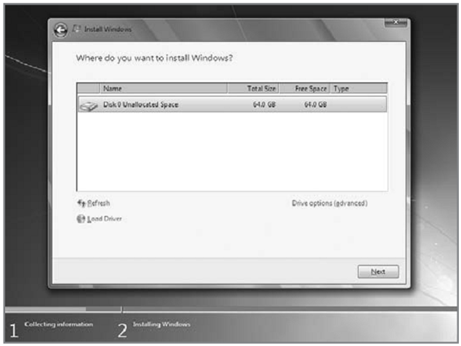
image

  • Proses instalasi dimulai brader… di tinggal juga boleh, memakan beberapa puluh menit tergantung spesifikasi komputer brader, katanya sih udah ada yang nyoba instal di komputer pentium 2 dan memakan waktu belasan jam!! haha… kalo komputer baru kurang dari sejam kok

image

  • Setelah proses di atas selese komputer akan otomatis restart sendiri. kumudian muncul seperti dibawah

image

  • Ketikkan nama user dan nama komputer, terserah apa aja, misal nama brader sendiri

image

  • Kemudian bikin password biar komputer brader aman, tulis 2x dan harus sama, kemudian password hint diisi dengan clue kalo misalnya brader lupa ama passwornya. gak di isi juga gak apa apa.

image

  • Masukkan Windows Product key, biasanya ada di paket dvd intalasi nya. kalo misalnya brader gak punya poduct key nya di kosongin aja, brader diberi kesempatan mencoba windows 7 selama 30 hari

image

  • Selanjutnya brader disuruh memilih setingan apakah windows akan otomatis meng update sendiri ato tidak, pilih suka2 brader aja ya

image

  • Kemudian setingan time zone sesuaikan dengan tempat tinggal brader

image

  • Selesai deh brader… install driver2 hardware komputer agar windows berjalan secara maksimal, seperti driver vga, audio, chipset, network, bluetooth dan lain2. Sgerr kan tampilannya… hehe. slamat mencoba brader…

image

buat yang pengen tau perbedaan fitur tiap edisi windows 7, silahkan baca postingan yang ini http://ferireza.wordpress.com/2009/11/24/perbandingan-windows-seven-7-starter-home-premium-profesional-dan-ultimateenterprise/

Review Software matematica 7


http://www.wolfram.com/products/mathematica/newin7/images/newin7background.gif
From computation to visualization, development to deployment, Mathematica 7 builds on 20 years of innovation to deliver one vision: the ultimate technical application and environment. Mathematica 7 includes over 500 new functions and 12 additional application areas, all seamlessly integrated in one system that gives you unprecedented workflow, coherence, and reliability.
More about Mathematica »
Built-in Digital Image Processing & Analysis »
Introducing a new generation of industrial-strength image processing, built into Mathematica's integrated algorithm, programming, and interface platform...
Built-In Image Processing & Analysis
Built-in Parallel Computing »
Take advantage of the latest multicore processors with Mathematica's new automatic parallel computing technology--seamlessly parallelizing your computations...
Built-In Parallel Computing
Visualization & Graphics
Automated Charting Graphics »
Algorithmic information visualization takes a major step forward by using Mathematica's symbolic architecture, flexible graphics, and automatic computational aesthetics...
Automated Charting Graphics
New Graphics Primitives »
Tubes, rounded rectangles, and 3D arrows join the powerful primitives integrated into Mathematica's graphics system...
Vector & Field Visualization »
Create automatically optimized visualizations of vector fields and streamlines--for fluids, electrodynamics, and other fields...
Vector & Field Visualization
Comprehensive Spline Support »
The world's most general splines, in any number of dimensions, fully integrated into computation and graphics...
Comprehensive Spline Support
All New Functions »
Guide to what's new in visualization & graphics
Other Recently Added Features
High-Impact Adaptive Visualization »

Automated Computational Aesthetics »

Fully Automated Graph Layout »

Real-Time 3D Graphics »

Automated Table Layout »

Dynamic Interactivity »
Mathematics & Algorithms
Industrial-Strength Boolean Computation »
Apply high-performance Boolean analysis, optimization, and verification to systems with thousands of variables--all integrated into the Mathematica workflow...
Discrete Calculus »
Solve a new generation of discrete problems with the first-ever comprehensive system for discrete symbolic calculus...
Delay Differential Equations »
DDEs are now an integral part of Mathematica's automatic numerical differential equation solving capabilities...
Differential & Difference Roots »
A breakthrough allows direct handling of implicit solutions of differential and difference equations--dramatically generalizing the concept of special functions...
Differential & Difference Roots
Transcendental Roots »
Introducing the first-ever systematic algorithmic treatment of roots of transcendental equations...
Transcendental Roots
Finite Group Theory »
Data and algorithms on finite groups are now integrated into the Mathematica system...
Integer Sequence Analysis »
Mathematica 7 introduces a suite of new approaches to the analysis and recognition of integer sequences...
Integer Sequence Analysis
New Number Theory Capabilities »
New aspects of analytic, multiplicative, and additive number theory are now available in computational form...
New Number Theory Capabilities
New Categories of Special Functions »
q Functions, L Functions, and a range of other functions join the world's largest collection of special functions...
Enhanced Fourier Analysis »
Explicit Fourier series are now fully integrated into Mathematica's symbolic capabilities...
All New Functions »
Guide to what's new in mathematics & algorithms
Other Recently Added Features
Integrated Geometric Computing »

Combinatorial Optimization »

Constrained Nonlinear Optimization »

Equational Theorem Proving »

High-Level String Computation »

New Generation Numerical Integration »
Computable Data
Integrated Genomic & Protein Data »
Look up sequences, genes, and proteins for immediate use in analysis, modeling, and visualization...
Integrated Genomic & Protein Data
Dynamic Astronomical Computation »
Compute current sky and absolute positions of planets, minor planets, stars, and more, all inside Mathematica...
Dynamic Astronomical Computation
Current & Historical Weather Data »
Use current and historical weather data from around the world for computation, visualization, and analysis...
Current & Historical Weather Data
Extended Chemical Data »
More than double the number of compounds and properties are now included...
Extended Chemical Data
Integrated Geodesy & GIS »
Use the latest high-precision geodetic techniques, directly connected to geographic data...
Integrated Geodesy & GIS
All New Functions »
Guide to what's new in computable data
Other Recently Added Features
Financial Data »

Astronomical Data »

Country Data »

Particle Data »

Graph Data »

Mathematical Data »
Data Manipulation
Statistical Model Analysis »
Linear and nonlinear models, probit, logit, and much more are all immediately available, integrated into Mathematica, with scores of diagnostics and options...
Automatic Histogram Generation »
Take data and automatically create optimized histograms in 2D and 3D...
Automatic Histogram Generation
Integrated Programmatic Email »
There's now a Mathematica function that sends anything as email, including graphics and other attachments...
Integrated Programmatic Email
Secure Website & Network Connectivity »
Automatically manage passwords, encryption, etc. in interacting with secure websites, databases, and more...
See also:
Built-in Digital Image Processing & Analysis »
All New Functions »
Guide to what's new in data manipulation
Other Recently Added Features
Exploratory Data Analysis »

Symbolic Sound Support »

Symbolic Report Generation »

3D Printing & Scanning Support »

Symbolic Statistical Computing »
Core Language
Sequence Alignment & Analysis »
Efficiently align and analyze strings and lists of any length, for bioinformatics, text comparison, and more...
See also:
Built-In Parallel Computing »
All New Functions »
Guide to what's new in core language
Other Recently Added Features
Unification of Graphics, Text & Controls »

Language for Data Integration »

Dynamic Graphical Input »

Instant Multimedia Programming »

Real-Time Code Annotation »

Instant High-Level Debugging »
Interface & User Experience
Speech Output »
Have Mathematica speak mathematical expressions, programs, and diagrammatic graphics...
Enhanced Typesetting Automation »
Achieve a new level of clarity and elegance in the automatic formatting of mathematical expressions of any length...
Enhanced Typesetting Automation
Optimized Notebook Ergonomics »
New context-sensitive interface elements streamline notebooks for both novices and experts...
Quick-Start Assistant Palettes »
Access features of Mathematica immediately through extensive Assistant palettes...
Quick-Start Assistant Palettes
New Interface Elements »
Several new elements further extend Mathematica's rich interface-building capabilities...
New Interface Elements
All New Functions »
Guide to what's new in interface & user experience
Other Recently Added Features
Symbolic Interface Construction »

Integrated Graphics Editing & Drawing »

Built-in Gamepad & HID Support »

Streamlined Presentation Framework »

New Documentation Framework »

Dynamic Interactivity »


http://www.wolfram.com/products/mathematica/newin7/